

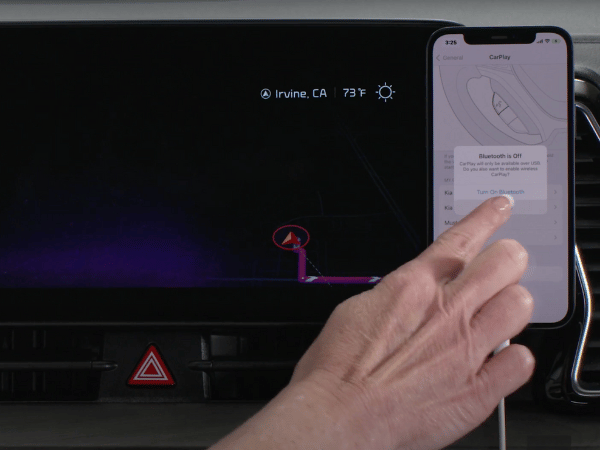
Stay connected while you’re on the move with Apple CarPlay and Android Auto. Use your phone safely without the need to look down. Whether you want to make a call, pull up directions, or switch up the music, these features make it simple. At Crain Kia of Bentonville, we’re excited to demonstrate why these tools are ideal for every Kia driver.
Connecting Your Smartphone
Connecting your phone to your Kia’s infotainment system is easy and hassle-free. Some Kia vehicles provide a wireless connection for up to six devices, perfect for families who want to share their media. Keep in mind, though, that certain models might require a physical cable for connection. Once your smartphone is connected, you can quickly access apps and features right on your car’s infotainment screen.
Are you shopping for an SUV in Northwest Arkansas? Click here to learn about the 2025 Sportage.
Voice Commands
Thanks to their voice command features, driving becomes simpler and safer when you use Apple CarPlay or Android Auto. With Siri or Google Assistant’s assistance, you can navigate, listen to music, or text without having to touch your phone. This allows you to keep your attention on the road, ensuring a safer journey.
Easy Access to Your Favorite Apps
You can effortlessly access your phone’s applications right on your car’s display screen by linking your phone through Apple CarPlay or Android Auto to your Kia’s display system. This setup allows you to safely make phone calls, send messages, and navigate without needing to handle your phone.
- Calling and Texting: You don’t have to take your hands off the steering wheel to make calls or send texts. Simply ask Siri or Google Assistant to do it for you.
- Changing Your Tunes: Enjoy your favorite playlists, podcasts, or audiobooks on the go. Thanks to Apple CarPlay and Android Auto, accessing your favorite music apps like Spotify and Apple Music is a breeze while you’re out and about.
- Navigation: You no longer have to fumble with your phone for directions anymore. Use apps like Apple Maps, Google Maps, or Waze to get directions right on your car’s screen. These apps can also update you on real-time traffic conditions, helping you avoid delays.
Apple CarPlay/Android Auto Tips
Here are some easy tips to maximize the benefits of your App Connect functionalities:
- Check Compatibility: Check if your smartphone is compatible with Apple CarPlay or Android Auto. Although most new models support these features, it’s a good idea to confirm.
- Read Your Car’s Manual: Every Kia model operates differently. For precise setup guidance, refer to the specific owner’s manual.
- Ensure Your Phone is Updated: Keep your phone and its applications up to date for the best experience.
Visit our blog to learn about leasing a Kia.

Use Kia App Connect Today!
Driving becomes more fun and much safer with Apple CarPlay and Android Auto. These technologies help you keep in touch, enjoy your favorite music, and access information safely while keeping your eyes on the road. Connect your device wirelessly or using a USB cable to experience smarter driving.
Stop by Crain Kia of Bentonville to see how Kia App Connect can improve your drive, or shop our selection online.
Connect with us


Recent Blog Entries
- Kia Earns Best Cars for the Money Awards for Seven 2026 Models
- 2027 Kia Telluride vs. 2026 Toyota Highlander: Best SUV For NWA?
- The 2026 Kia K4 Hatchback Is Coming Soon to Crain Kia of Bentonville
- 2027 Kia Telluride Preview: Coming Soon to Crain Kia of Bentonville
- 2025 Kia Soul Earns a Spot on Cars.com’s Best Under $30k
Categories
 Warranties include 10-year/100,000-mile powertrain and 5-year/60,000-mile basic. All warranties and roadside assistance are limited. See retailer for warranty details.